9 Using Notifications
The page Notifications offers an overview of system messages about important events in OPENVAS SECURITY INTELLIGENCE. These can be success messages as well as warnings or error messages.
The notifications can be used for debugging purposes.
9.1 Viewing Notifications
All existing notifications can be displayed by selecting Notifications in the menu.
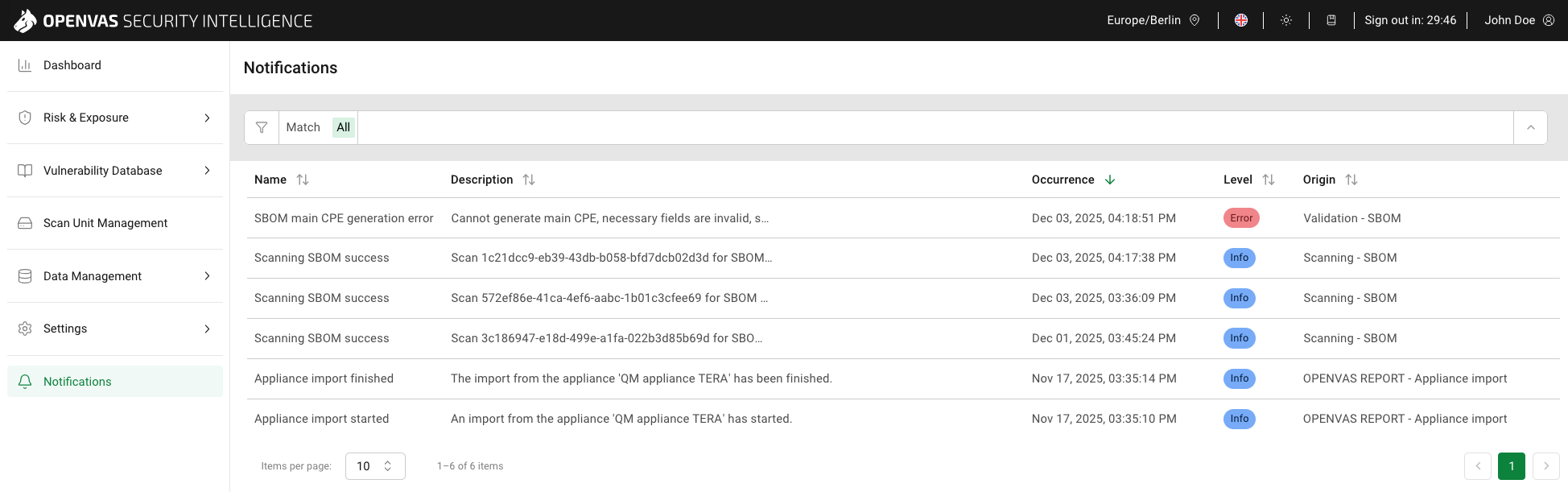
Fig. 9.1 Notifications page
Tip
In the Column options drop-down menu, the columns to be displayed in the table can be selected.
The columns can be rearranged using drag and drop.
For all notifications, the following information is displayed:
- Name
Type of the event that occurred.
- Description
Detailed description of the event.
Moving the cursor over the descriptions displays a tooltip containing the whole message.
- Occurrence
Date and time the event occurred.
- Level
 An action finished successfully, or a user interaction was carried out successfully.
Examples:
An action finished successfully, or a user interaction was carried out successfully.
Examples:An SBOM scan finished successfully.
The download of new CSAF files finished successfully.
An SBOM scan was canceled successfully.
The download of new CSAF files was canceled successfully.
An import from an appliance was started.
An import from an appliance was finished successfully.
 An action failed due to a faulty user interference.
Example:
An action failed due to a faulty user interference.
Example:An SBOM scan was interrupted by a server shutdown.
 An action failed due to an incorrect configuration.
Examples:
An action failed due to an incorrect configuration.
Examples:The download of new CSAF files failed due to an error on the CSAF provider side.
An SBOM main CPE generation failed because the necessary fields are invalid.
An import from an appliance failed.
- Origin
Action and/or item to which the message refers, for example an SBOM scan, successful download from a specific CSAF source, or an data import from an appliance.
9.2 Filtering Notifications
The list of notifications can be filtered as described in Chapter 5.4.
Note
If a filter delivers no results, the table with the list of notifications shows No data available.