3 OPENVAS SCAN – Overview
OPENVAS SCAN is a dedicated appliance for vulnerability scanning and vulnerability management. It is offered in different performance levels.
3.1 Hardware Appliances
Tip
A full product overview of all OPENVAS SCAN models can be found here.
3.1.1 Large Companies – OPENVAS SCAN G90 and OPENVAS SCAN 6500/5400
OPENVAS SCAN G90, OPENVAS SCAN 6500 and OPENVAS SCAN 5400 are designed for use in large companies.
They can control other appliances as sensors and can also be controlled as sensors by other appliances.
The appliances come in a 2U 19” chassis for easy integration into the data center. For simple installation and monitoring, they are equipped with a two-line LC display with 16 characters per line. For uninterruptible operation, they have four solid-state drives (SSDs), redundant, hot-swappable power supplies, and redundant, hot-swappable fans.
The appliances use RAID (Redundant Array of Independent Disks) 6 as a software RAID. RAID is a data storage virtualization technology that combines multiple storage drives into one or more logical units for the purposes of data redundancy.
For managing the appliances, two serial ports (RJ45, Mini USB) are available, in addition to two out-of-band management Gigabit Ethernet RJ45 ports.
To connect to other systems, the appliances come with a built-in module with eight Gigabit Ethernet RJ45 ports. Additionally, the appliances can be equipped with up to three more modules. The following modules can be used in any order:
Module(s) with 8 Gigabit Ethernet RJ45 ports
Module(s) with 8 Gigabit Ethernet SFP ports
Module(s) with 2 10 Gigabit Ethernet SFP+ ports
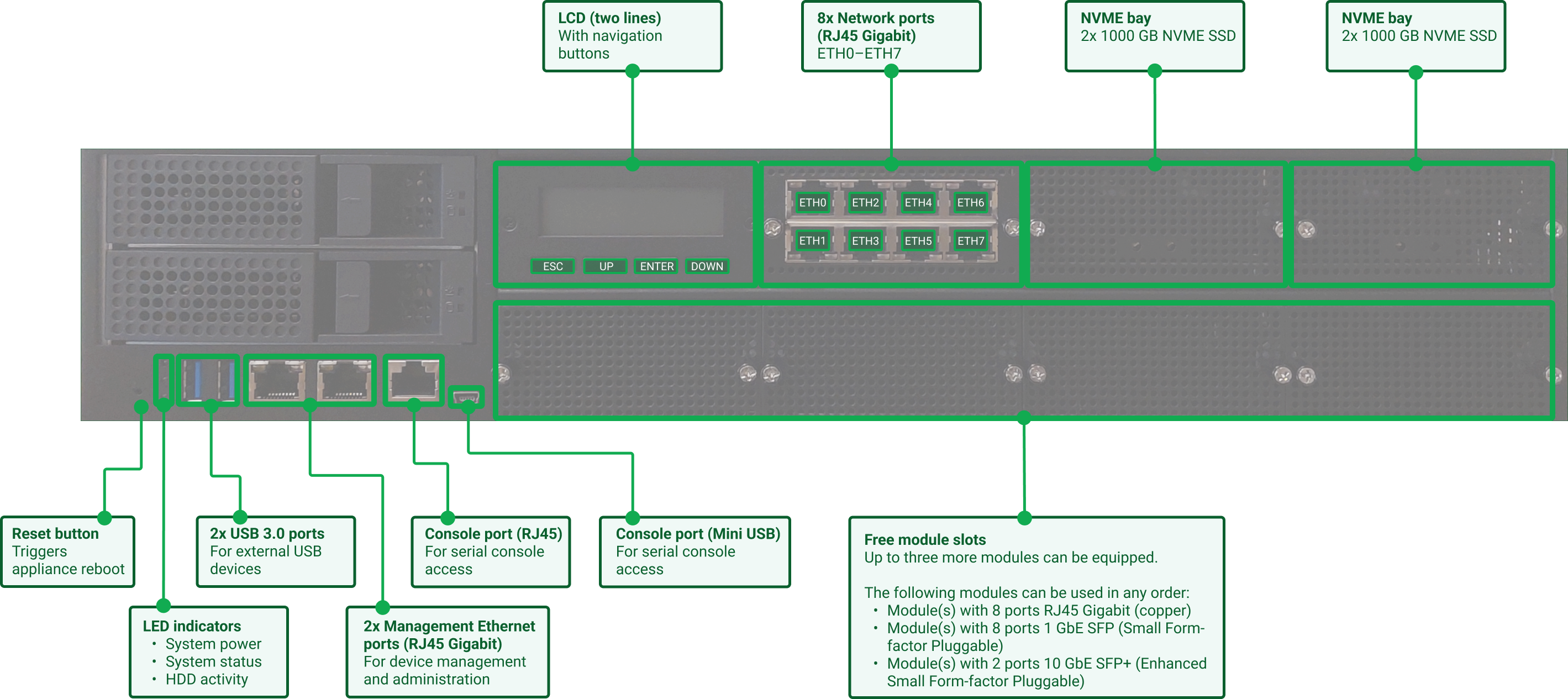
Fig. 3.1 Hardware front with labels
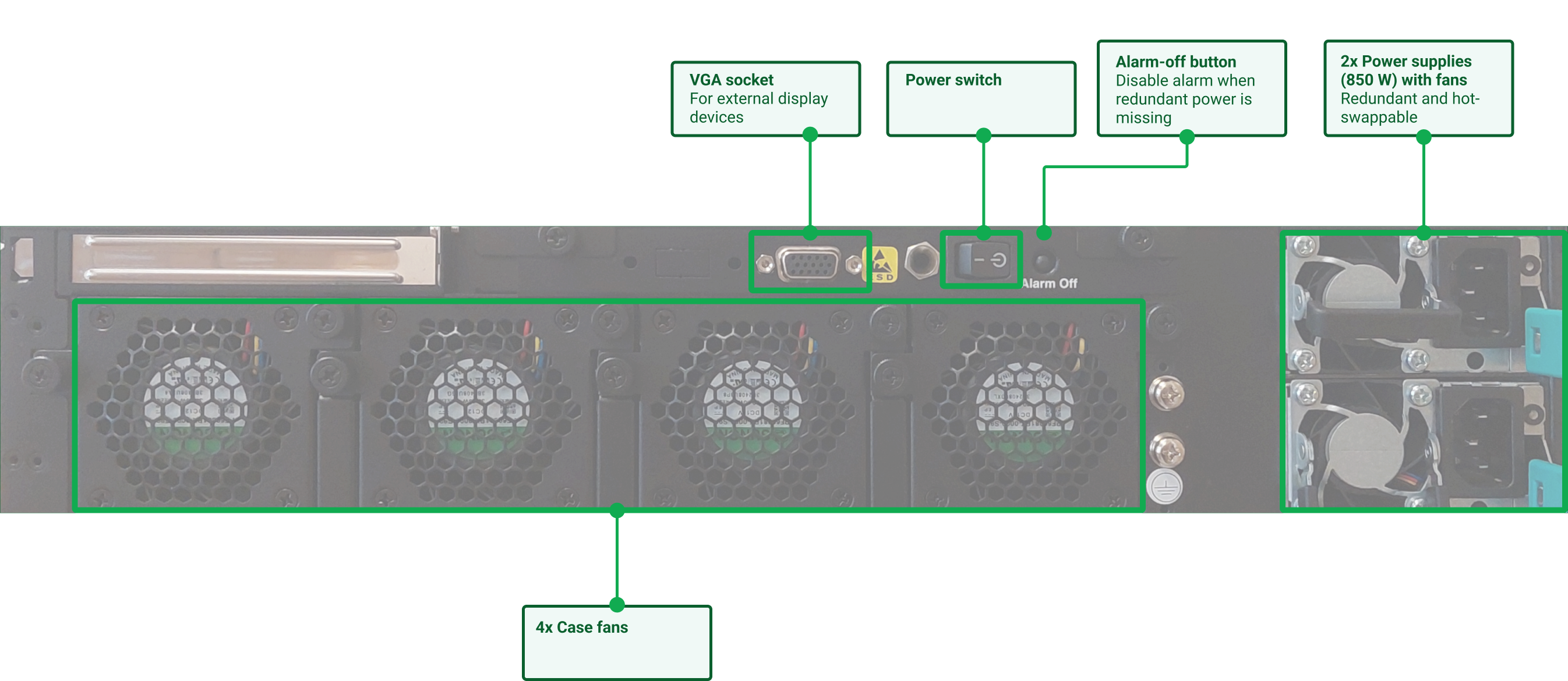
Fig. 3.2 Hardware back with labels
3.1.2 Medium-Sized Companies and Branches – OPENVAS SCAN G30/G10 and OPENVAS SCAN 650/600/450/400
OPENVAS SCAN G30, OPENVAS SCAN G10, OPENVAS SCAN 650, OPENVAS SCAN 600, OPENVAS SCAN 450 and OPENVAS SCAN 400 are designed for medium-sized companies and larger branch offices.
They can control other appliances as sensors and can also be controlled as sensors by other appliances.
The appliances come in a 1U 19” chassis for easy integration into the data center. For simple installation and monitoring, they are equipped with a two-line LC display with 16 characters per line. For uninterruptible operation, the appliances come with redundant fans.
For managing the appliances, a serial port (RJ45) is available.
To connect to other systems, the appliances come with ten ports in total:
8 Gigabit Ethernet RJ45 ports
2 10 Gigabit Ethernet SFP+ ports
A modular configuration of the ports is not possible. One of these ports can be used as a management port.
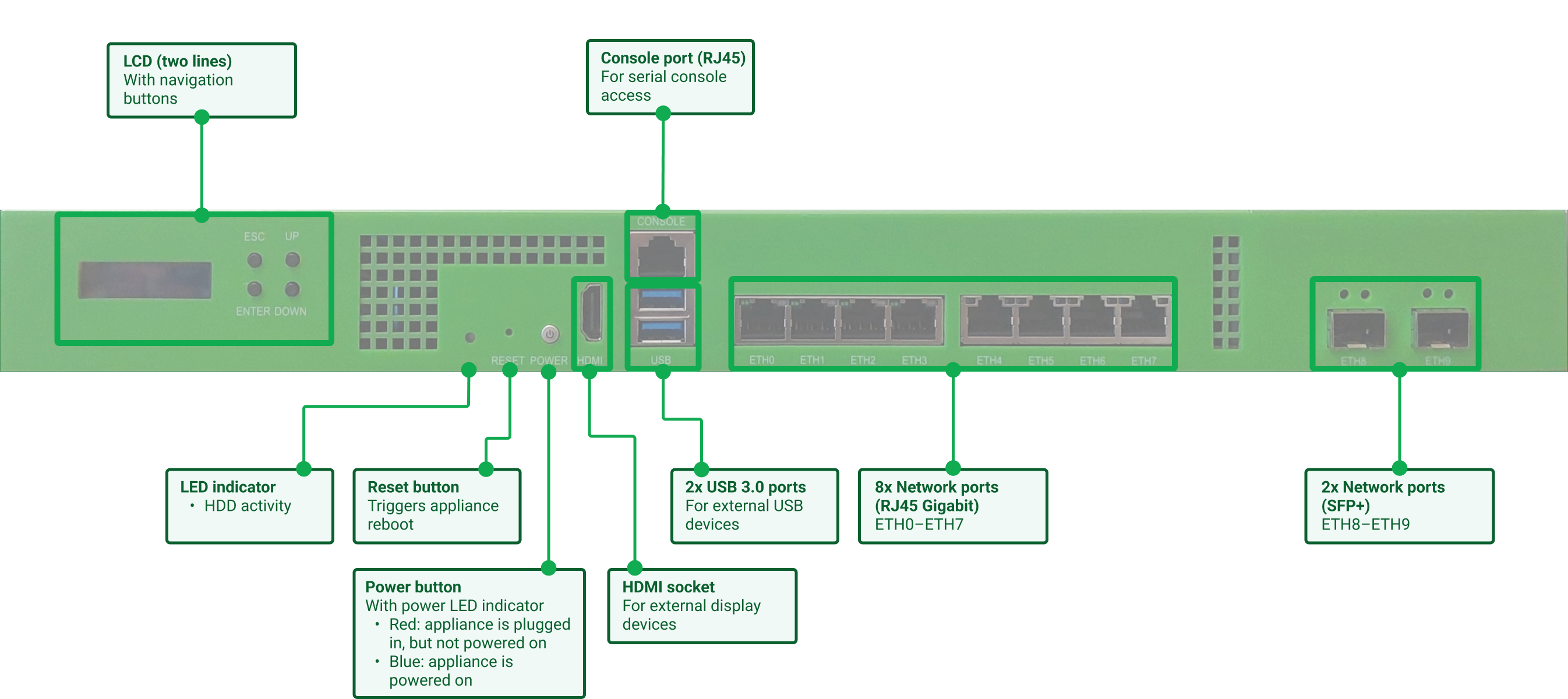
Fig. 3.3 Hardware front with labels
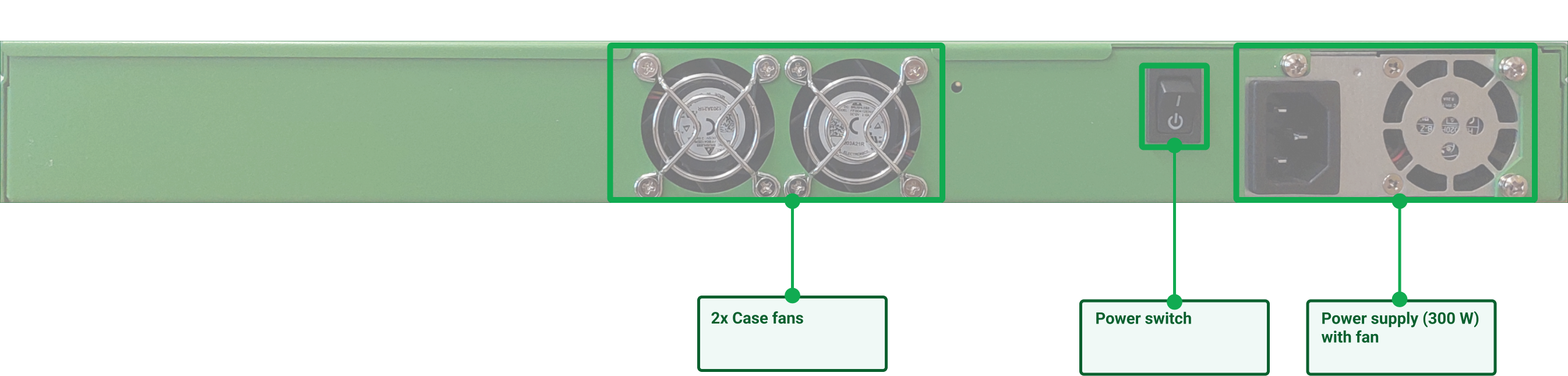
Fig. 3.4 Hardware back with labels
3.1.3 Small Companies and Branches – OPENVAS SCAN 150
OPENVAS SCAN 150 is designed for small companies as well as for small to medium-sized branch offices.
It cannot control other appliances as sensors. However, the appliance itself can be controlled as a sensor by another appliance.
The appliance comes in a 1U 19” chassis for easy integration into the data center. For simple installation and monitoring, it is equipped with a two-line LC display with 16 characters per line. For uninterruptible operation, the appliance comes with redundant fans.
For managing the appliance, a serial port (RJ45) is available.
To connect to other systems, the appliance comes with ten ports in total:
8 Gigabit Ethernet RJ45 ports
2 10 Gigabit Ethernet SFP+ ports
A modular configuration of the ports is not possible. One of these ports can be used as a management port.
Fig. 3.5 Hardware front with labels
Fig. 3.6 Hardware back with labels
3.1.4 Sensor – OPENVAS SCAN 35
OPENVAS SCAN 35 is designed as a sensor for distributed scan systems.
The appliance can only be used as a sensor and must be managed via a master appliance. For this reason, it does not have a web interface itself. Appliances from OPENVAS SCAN 400 and OPENVAS SCAN DECA can be used as masters for OPENVAS SCAN 35.
The appliance comes in a 1U steel chassis. For easy integration into the data center, an optional rackmount kit can be used. The appliance does not come with a display.
For managing the appliance, a serial port (RJ45) is available.
To connect to other systems, the appliance comes with four Gigabit Ethernet RJ45 ports. One of these ports can be used as a management port.
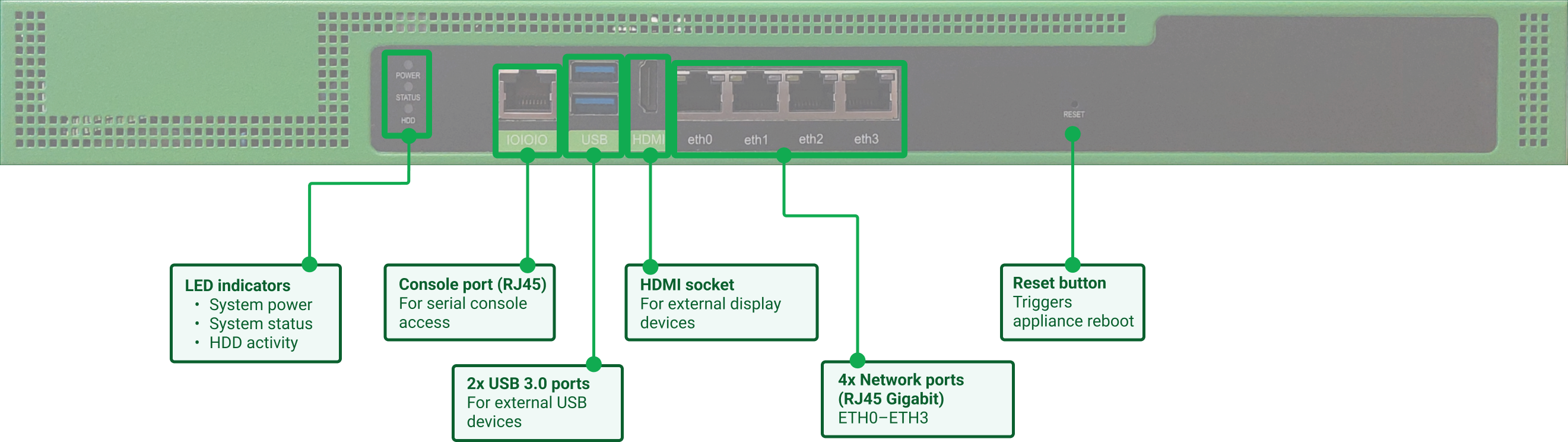
Fig. 3.7 Hardware front with labels
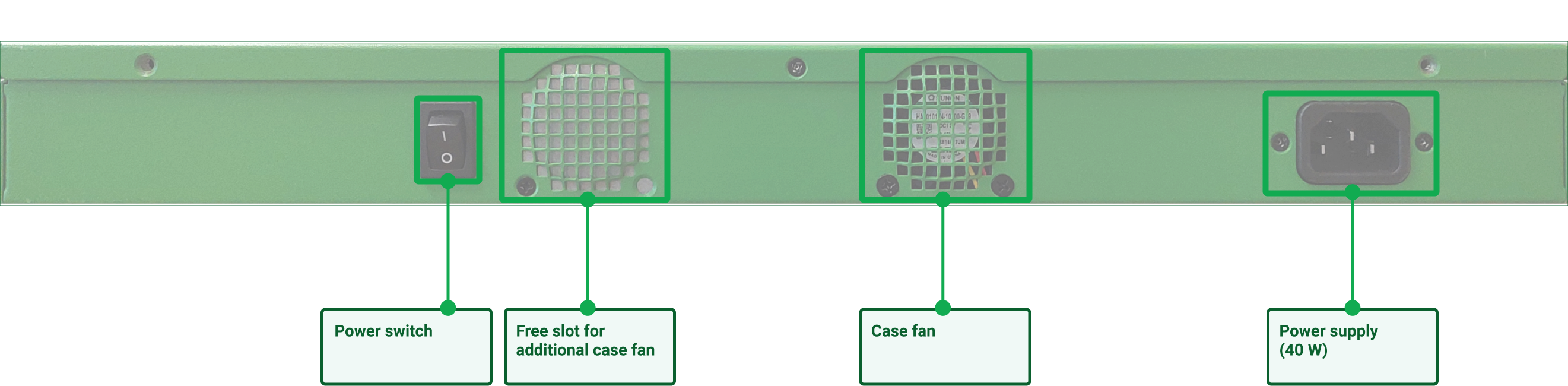
Fig. 3.8 Hardware back with labels
3.2 Virtual Appliances
Tip
A full product overview of all OPENVAS SCAN models can be found here.
3.2.1 Companies of All Sizes – OPENVAS SCAN VIRTUAL
OPENVAS SCAN VIRTUAL is designed for companies of all sizes. The scan performance depends on the resources provided by the hypervisor.
It can control other appliances as sensors and can also be controlled as a sensor by another appliance.
To connect to other systems, the appliance comes with eight dynamic, virtual ports. One of these ports can be used as a management port.
3.2.2 Medium-Sized Companies and Branches – OPENVAS SCAN EXA/PETA/TERA/DECA
OPENVAS SCAN EXA, OPENVAS SCAN PETA, OPENVAS SCAN TERA and OPENVAS SCAN DECA are designed for medium-sized companies and larger branch offices.
They can control other appliances as sensors and can also be controlled as sensors by other appliances.
To connect to other systems, the appliances come with eight dynamic virtual ports for OPENVAS SCAN EXA/PETA/TERA, and four for OPENVAS SCAN DECA. One of these ports can be used as a management port.
3.2.3 Small Companies – OPENVAS SCAN CENO
OPENVAS SCAN CENO is designed for small companies as well as for small to medium-sized branch offices.
It cannot control other appliances as sensors. However, the appliance itself can be controlled as a sensor by another appliance.
To connect to other systems, the appliance comes with four dynamic, virtual ports. One of these ports can be used as a management port.
3.2.4 Sensors – OPENVAS SCAN SENSOR and OPENVAS SCAN 25V
OPENVAS SCAN SENSOR and OPENVAS SCAN 25V are designed as sensors for distributed scan systems.
The appliances can only be used as sensors and must be managed via master appliances. For this reason, they do not have a web interface themselves. Appliances from OPENVAS SCAN 400 and OPENVAS SCAN DECA can be used as masters for OPENVAS SCAN SENSOR and OPENVAS SCAN 25V.
To connect to other systems, the appliances come with four dynamic, virtual ports. One of these ports can be used as a management port.
3.2.5 Entry-Level Solution – OPENVAS BASIC
OPENVAS BASIC is designed as an entry-level appliance with a reduced feature set. It can neither control other appliances as sensors nor be controlled as a sensor by another appliance.
The appliance comes with one virtual port used for management, scanning and updates.
Note
It is required to use OPENVAS BASIC with the OPENVAS ENTERPRISE FEED. Using the OPENVAS COMMUNITY FEED is not possible.
For OPENVAS BASIC, an OPENVAS ENTERPRISE FEED subscription key does not include access to the Greenbone Support Team by default. Access must be purchased separately. For further details, contact sales@greenbone.net.
3.2.6 Entry-Level Solution – OPENVAS SCAN ONE
OPENVAS SCAN ONE is designed as an entry-level appliance with a reduced feature set. It can neither control other appliances as sensors nor be controlled as a sensor by another appliance.
The appliance comes with one virtual port used for management, scanning and updates.